









Group 01
Heroes
Opens a page. Sets tone, names the audience, and frames the argument that follows.
HeroSplit — challenge variant
Two-column layout: headline on the left, body + CTAs on the right. Use when the headline carries weight and the body needs room to breathe. Variants: size: 'large' | 'compact', optional eyebrow icon, optional decoration overlay (homepage), optional secondary CTA style.
Your buyers get a number. They don't get a plan.
Buyer's Toolbox closes the gap between the financial target and the buying decision — so buyers have structured guidance at the category level without losing the autonomy that makes them effective.
HeroCenter — product variant
Centered, focused. Used on every product page. Smaller H1 sizing than HeroSplit. Container width adjustable for longer headlines (BAR uses 1060px, DS uses 720px).
Find the lost margin hiding in plain view.
Your business is solid. And yet, margin is still leaking through the patterns your team doesn't see.
HeroLeft — integrations / pricing variant
Single-column left-aligned hero, often with a side decoration. Used when the page is more reference than narrative.
Your ERP is already supported.
Buyer's Toolbox connects to the systems already running your business.
View Integrations ↓ProseBridge — hero variant (about pages)
Centered narrative hero. Set isHero: true to render h1, optional showDownArrow for the about/approach treatment.
Planning is a discipline.
We build software that treats it like one.
Most planning tools are built around features. The problem is that a planning team doesn't fail because the software lacked a feature.
Group 02
Trust & Credibility
Establishes legitimacy. Use sparingly — too much trust signal feels insecure.
LogoTicker
Marquee of customer logos. Top of page (after hero) or as a section divider. tagline + showTagline props control the "Trusted by..." line above the strip.
Trusted by planning teams across 20+ countries for over 30 years.













StatHeroBar — inline (homepage)
Compact inline stats. Small, dense, scannable. Sits well stacked with LogoTicker below the hero.
StatHeroBar — stacked (about pages)
layout: "stacked" renders bigger numbers above labels. Use when stats are the section's main signal, not punctuation.
Founded
Implementations worldwide
Countries served
Outside funding taken
PullQuote
Customer quote with name + title. Use as breath after dense content, not before. Color-themable per product.
“We went from planning the entire year in a massive Excel file that took weeks to process, to planning a year in a matter of days.”
David C.
Head of Planning, Large Retailer
Group 03
Bridges & Navigation
Transitions between argument arcs. Lets the reader come up for air or jump ahead.
ProseBridge
Centered eyebrow + headline + optional body. Marks the start of a new argument arc. Variants: isHero (renders h1), showDownArrow, containerMaxWidth.
Better, faster merchandise planning for less.
Buyer's Toolbox doesn't replace your planners. It gives them the reach, speed, and visibility they can't get from a spreadsheet.
Subnav — buttons mode
Sticky in-page navigation. mode: 'links' = anchor scroll-spy (product pages); mode: 'buttons' = persona switcher (challenge pages — pairs with PersonaCapabilities).
Group 04
Problem Framing
Names the pain. Strongest right after the hero — once readers see themselves in it, the solution lands.
ProblemStack
3-item bulleted pain enumeration on a black bg. Items stagger-fade in on scroll by default. Variants: animate: false (XI uses static), iconStyle (custom CSS filter for non-orange icons), optional id for subnav anchors.
No structure means crossed-fingers, or micromanagement.
Without a structure between the financial plan and the buying decision, those are the only two ways your team stays on plan.

You're reviewing every purchase order because there's no other way to stay on plan. Category mix, vendor splits, seasonal flow — if you don't check it, nobody will.

When you do step back, problems surface too late to fix. By the time you see it, the season is over.

The planning work exists — it's just not reaching the people making decisions. So they buy the way they've always bought.
ProblemStatement — linked variant
Each item is a clickable link to a deeper page. Used on the homepage to route readers to challenge pages. Optional side decoration + bouncing arrow at the bottom signal "scroll on."
Turn. Margin. OTB.
Never enough planning.
Your Merchants need help. They deserve our software, coaching and support.


Group 05
Solution Overview
"Here's what we do" — the high-level moves. Comes before the per-feature drill-down.
BentoHowItWorks
1 wide featured step + 2 side-by-side steps. The challenge-page workhorse. Featured step optionally embeds a logo marquee.
From budget number to buying guidance. In three steps.
The plan flows down to category level.
Buyer's Toolbox breaks the top-line financial target into category, vendor, and seasonal guidance automatically.

In-season monitoring.
Live variance tracking shows where the buy is running ahead of plan.

Buyers work from the plan.
Role-based dashboards put the planning output in front of the people making buying decisions.

BentoFeaturesGrid
Plain N-card grid. Used on BAR for "Make It Scale" infrastructure. When you have 2–4 equal-weight features without a dominant featured one.
Demand forecasting built into replenishment
Five forecasting algorithms feed directly into the OTS calculation.

Scale the whole footprint in one run
Batch jobs process your full product-location matrix at once.

BentoFeaturesAsymmetric — XI 5-card
Distinctive 3-row asymmetric layout (1 featured + 7/3 + 4/6) with sketchy SVG borders. Currently used on XI only — visual distinctiveness signals "this product is different."
We read the noise. You get the signal.
Recommendations, not just reports.
Every delivery includes an executive summary.
Ten things to act on.
Alerts are filtered, ranked, and prioritized.

Numbers you can trace.
Every alert includes the methodology behind it.

Visibility deeper than chain level.
When a location deviates, the alert fires at the store level.
Caught mid-season, not at clearance.
Trends are detected as they develop.
BentoCapabilitiesAsymmetric — AP 3-card
1 tall card spanning 2 rows + 2 stacked cards. Use when one capability is the headline and two others are supporting.
One system of record.
AP connects directly to your ERP — Dynamics 365, NetSuite, Mi9, Aptos, and many others.

Your naming conventions.
Build custom KPIs and formulas. Set flexible seasons.
Talk to the people who built it.
Direct access to the team that built the system.

BentoCapabilitiesPoC — homepage 4-card zigzag
2/1 + 1/2 zigzag with sketchy SVG borders. Optional eyebrow icon, intro, bottom CTA. Homepage uses this for the proof-of-concept story.
 Retailers across 20+ countries plan with Buyer's Toolbox.
We don't expect you to take a vendor's word for it.
Request a proof of concept. Before you spend a dollar with us, we'll build a working PoC with your actual data.
Show, not tell.
No canned demos. No sample data.

Familiar data.
Your sales history, your categories, your store structure.
No fuss.
Most PoCs are running within a week or two.

Risk-free.
No commitment, no contract, no pressure.

TabbedShowcase
Top tabs + alternating image/copy panes. Used when the solution is best understood by clicking through real product UI screenshots. Color-themable.
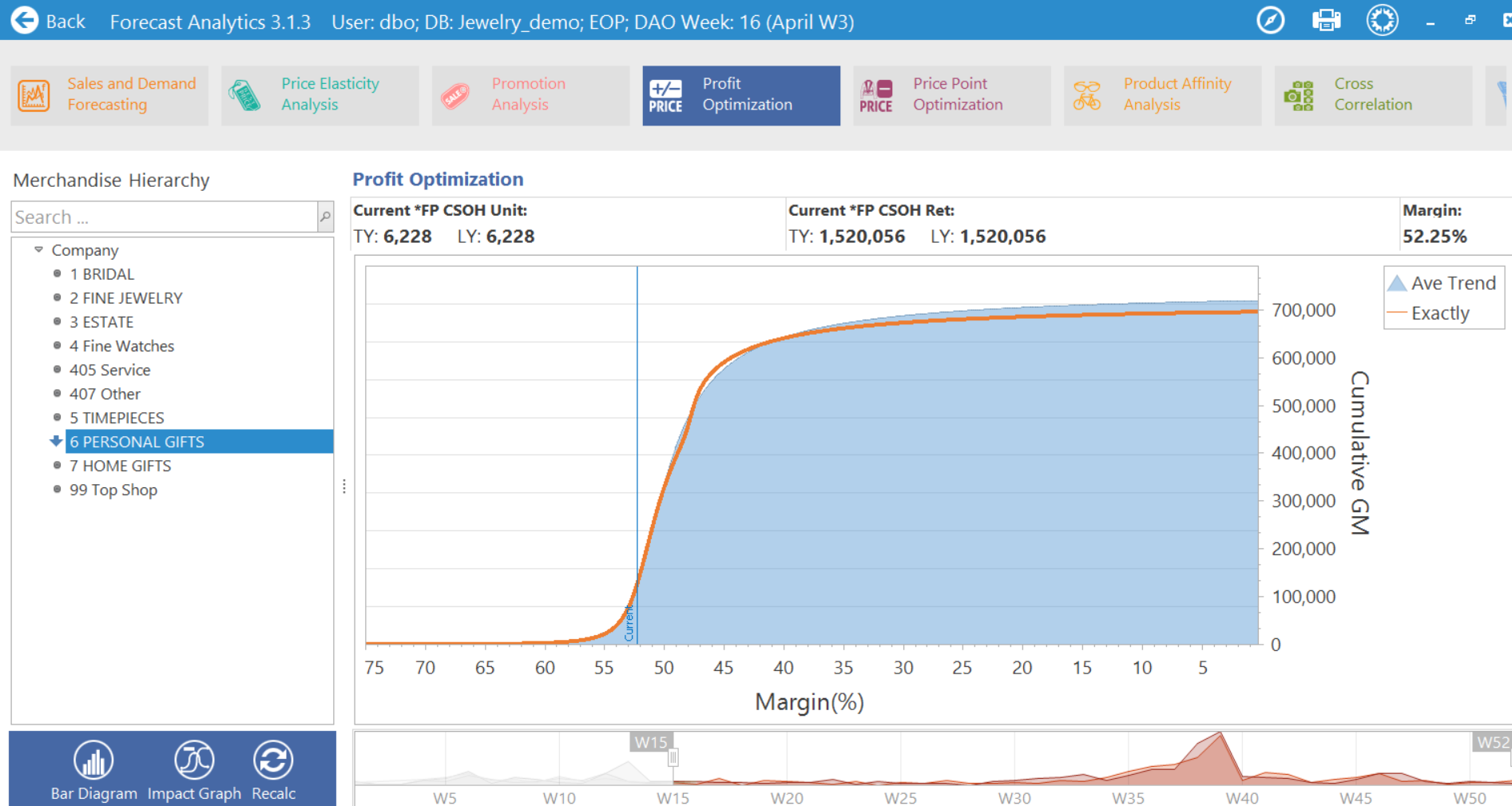
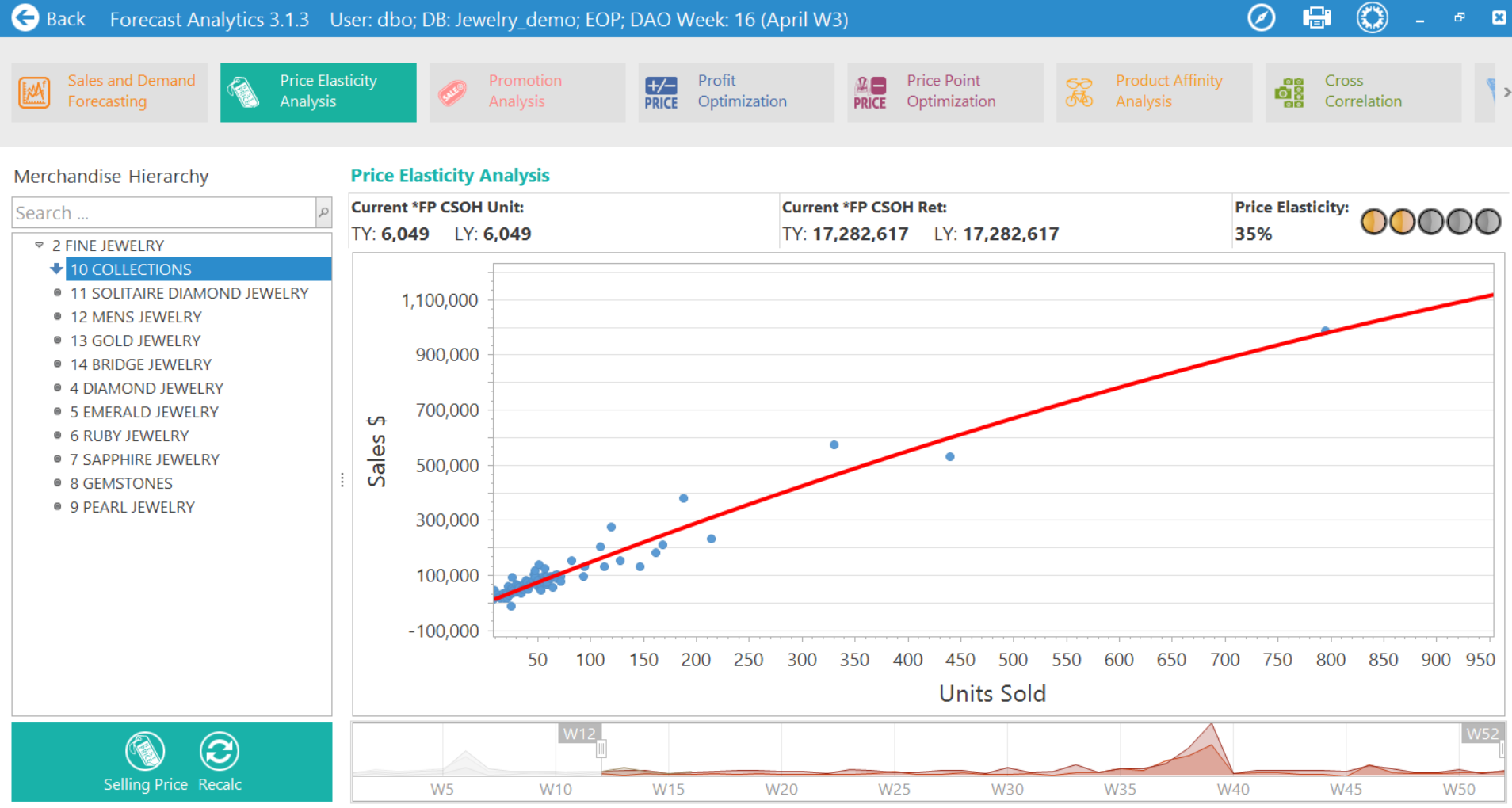
Seasonal margin and pricing insights.
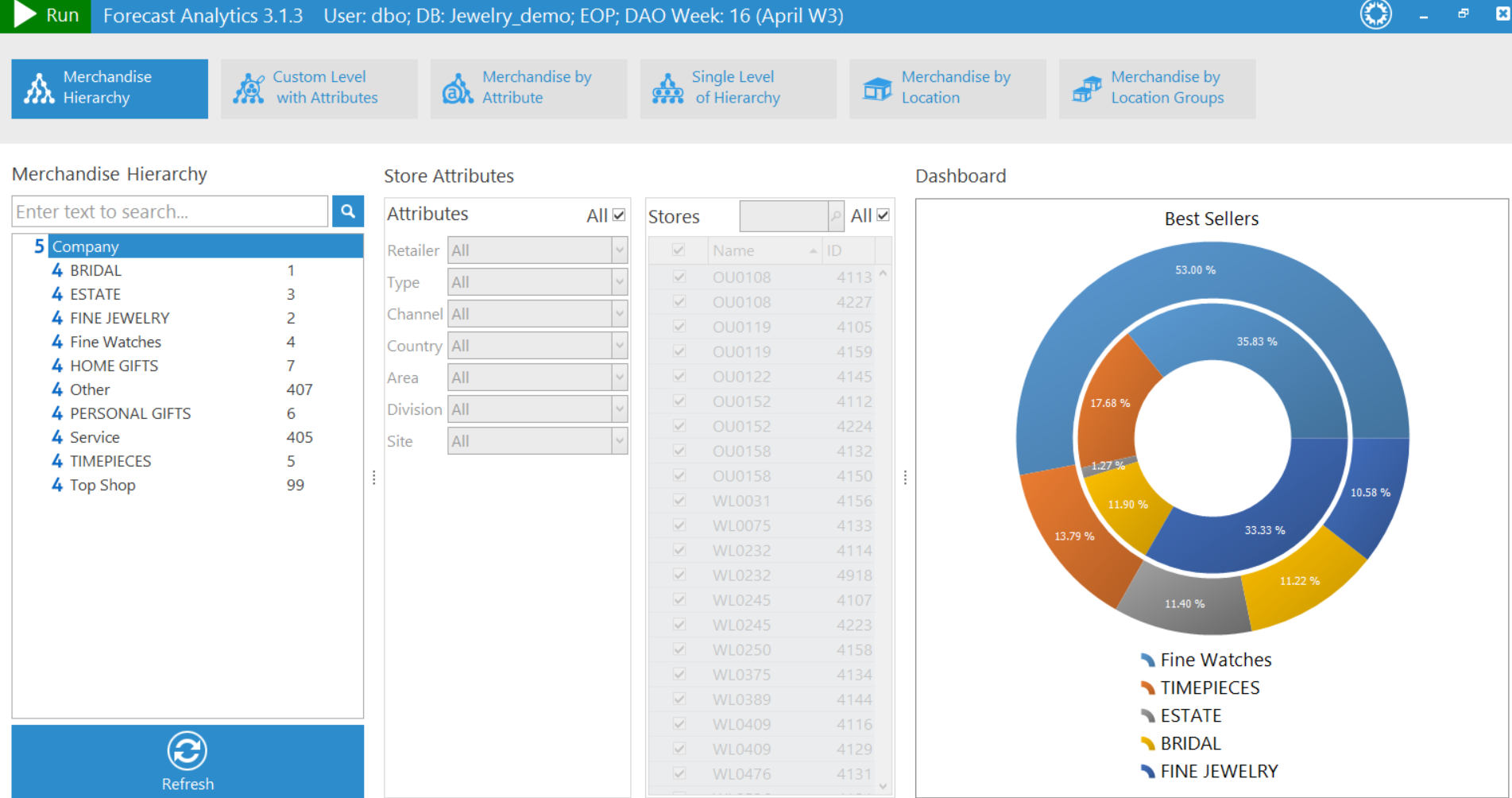
Work from Known Data
All the data is already in there.
Group 06
Detail Modules
Drill into one capability with copy + illustration. Best in sequences of 2–4 — more becomes monotonous.
ContentMediaSplit
The most-used module on the site. Copy column + illustration column, alternating sides via imageRight. Variants: optional eyebrowIcon (homepage), optional button cta, multi-paragraph body, image width tokens (45% / 55% / 400px), background class for alternating strips.
The selling price is often wrong.

FeatureCallout
Image-left + copy-right + pill tags below body. Used on BAR for the replenishment hero callout.
Automated replenishment that keeps every store in stock
Automated DC-to-store replenishment monitors stock positions and generates replenishment quantities.
Group 07
Persona & Role
Same argument, different lenses by role. Reader self-selects; scope deepens by context.
PersonaCapabilities
Persona tabs synced with Subnav (buttons mode). Each persona has 1–3 alternating content/illustration panels. Section is anchored at id="capabilities" for sticky-subnav scroll spy.
What changes when the plan and the buy are connected.
The difference looks different depending on where you sit.
Planning output that shapes the buy.
The planning output you spend your week building should be the guide buyers work from.

RoleSwitcher — XI static 3-up
3 persona cards with light-purple top + dark-purple lower section + checklist items. Static (despite the name; XI's version is non-interactive).
Pick where the signal lands.
Everyone's fighting different fires.

Planners & Buyers
Start the week with an action plan, not a hunt.
- ✓ Open a prioritized action list
- ✓ Know which stores need attention
- ✓ Spend your time planning

Merchandising VPs
Manage by exception.
- ✓ See which buyers are off-plan
- ✓ Know where to focus
- ✓ Spot patterns across stores
C-Suite
See dollar impact before the balance sheet.
- ✓ Know which problems cost real money
- ✓ Understand margin erosion
- ✓ Make resource decisions
Group 08
Process & Implementation
Explains "how this rolls out." Use when the engagement model is the sale, not just the software.
MigrationStepsNumbered — big-number eyebrow
3 columns with massive translucent number eyebrows. Used on about page for "How every engagement works" — the steps ARE the argument.
How every engagement works.
We load your data.
We connect to your ERP, pull your sales history, and build a working planning environment with your actual numbers.
We configure to your process.
Business process review before configuration. Best-practice templates embedded from day one.
We stay involved.
Ongoing coaching beyond go-live. Same people who built your system support it.
MigrationStepsTiles — icon tiles
3 icon-tile columns with eyebrow above headline. Used on about/approach for the "Avoiding Shelfware" model.
We built our planning system so it actually gets used.
Put your planners in control with Buyer's Toolbox in weeks, not months.

We prove it with your data.

We coach the planning process.

We keep planners in control.
MigrationStepsCircles — numbered circles + side image
Numbered circle steps in a left column with optional illustration on the right. Used on integrations.
IT handles the integration. Merchants focus on their work.
Map
We map the data needs to your planning needs.
Validate
Data flows into a sandbox environment. Your team verifies the numbers match.
Go live
Once validated, the integration runs continuously.

ImplementationTimeline — static (AP)
Progress bar + 3 milestone cards on dark bg, with the active step highlighted.
Today: We load your data
- ✓ Connect your ERP
- ✓ Import sales history & merchandise hierarchy
- ✓ No prep work on your end
1-2 weeks: Your environment is live
- ✓ Hierarchy configured
- ✓ Forecasts and OTB generated
- ✓ Your KPIs in the system
We show you the money
- ✓ Run scenarios with your numbers
- ✓ Pull leadership reports
- ✓ Decide whether this is the system
ImplementationTimelineInteractive — XI hover
4-step horizontal timeline; hovering a card / dot / label sets that step as active. Use when each step deserves equal weight and you want the reader to engage.
You send the data. We handle the rest.
Four steps from your first conversation to your first delivery.





Send us your data
Sales history, inventory positions, store structure.

We run the analysis
Performance compared against expected range.

We filter the noise
Findings ranked by dollar impact.

Get your first delivery
Executive summary. Ranked action table.
Group 09
Contrast
Before/after. Lands hardest as a recap *after* the solution shows what "after" looks like.
BeforeAfter
Two columns: status quo vs after Buyer's Toolbox. Variants: optional eyebrow, custom beforeLabel/afterLabel. Sequencing matters: lands hardest as a recap after the solution shows what "after" actually looks like.
Stop choosing between control and trust.
This isn't about controlling your buyers. It's about giving them something better than a budget number.

Without Buyer's Toolbox
You either review every PO or hope the buy follows the plan
Buyers get a budget number and fill in the rest from gut
Nobody sees drift until clearance — too expensive to fix
Planning output sits on a shared drive, disconnected
With Buyer's Toolbox
Structured category-level guidance replaces hovering over every buy
Buyers start with a framework — category, vendor, seasonal
In-season variance alerts flag drift while there's still time
Role-based dashboards put the plan into the buying decision
Group 10
Cross-Promotion
Invite readers to other products in the suite. Position before the close, not in the middle of the argument.
ProductSuiteScroll — challenge pages
Headline + horizontal-scroll card row of products. Compact. Used at the bottom of challenge pages.
Close the gap between the plan and the buy. End to end.




ProductSuiteBento — product pages
Headline+description column on the left + 4-product bento grid on the right. Color-themable per host product.
Data Science works alongside Advanced Planning to see deeper into the decisions that drive margin.
Learn more about our approach →ProductSuite — homepage variant
Homepage's distinctive 1+3 layout with sketchy SVG borders, side description, and optional decoration.
Each product solves a different part of the planning problem.
Group 11
Pillars
Three-up reinforcement on a defining promise. Most powerful when the rest of the page earned the claim.
SupportPillarsBlack
3 pillars on a black bg with optional embedded CTA above. Use as a punctuation block — the dark section signals "this is the conviction." Don't stack with another dark module.
Up and running before next season starts.
We don't start with a pitch deck. We start with your data.
Apply for your risk-free proof of concept →
Spreadsheet-style interface
Planners pick up AP fast. The ceiling doesn't.

Configure it yourself
Custom labels, formulas, fiscal years. No code.

Live in weeks, not months
Not enterprise-scale cost. Not enterprise-scale timeline.
SupportPillarsStats
3 stat-bordered cards on bg-gray-50. Use when each pillar leads with a number that anchors the claim (e.g., "1992", "50%+").
Profitable since day one.
Zero outside funding. Zero debt.
Revenue reinvested in R&D.
Every year. The product gets better because the team chooses to make it better.
Years with many clients.
Long-term relationships are the norm.
Group 12
Pricing-Specific
Modules tied to the pricing-page conversion path. Some hook into the page's sticky form via data-open-form / data-open-features.
PricingPlatformCard
The flagship pricing card. Eyebrow + headline + price + highlights + 2-column feature grid + CTAs. CTAs hook into data-open-form / data-open-features elsewhere on the page.
Advanced Planning.
Merchandise planning, OTB, sales forecasting, and reporting — the foundation.
Planning
- ✓ Merchandise financial planning
- ✓ Open-to-buy management
- ✓ Sales forecasting
Infrastructure
- ✓ Drill-anywhere reporting
- ✓ ERP integration
- ✓ Cloud-hosted
Extensions3Up
3-card grid for product extensions, each color-themed. Used on pricing for BAR/DS/XI add-ons.
Add what you need.

Allocation Replenishment
Best for multi-door retailers
Automated allocation from vendor to DC to door.
- Size-curve optimization
- Store clustering

Data Science.
Best for teams ready to optimize
Demand forecasting and price modeling.
- ✓ Price optimization
- ✓ Margin optimization

Exception Intelligence.
Best for teams drowning in data
Weekly performance alerts.
- ✓ Weekly exceptions
- ✓ Store-level detection
PoC2Col
2-column proof-of-concept walkthrough: numbered steps on the left, stats + pull quote credibility box on the right.
See it work with your data.
Share your data
Send us a representative sample.
We build it
Our team configures Advanced Planning around your hierarchy.
You evaluate
Walk through your own plans and reports.
PoC cost
years in retail
countries
lock-in contracts
“Buyer's Toolbox gave us a working PoC in two weeks — risk-free.”
VP Planning
Multi-brand specialty retailer
AccordionFAQ
Native <details> Q&A list with rotating-plus icon. Use sparingly — long FAQ lists are the wrong place to address objections.
Common questions.
What's included in the $995/mo? +
The full Advanced Planning platform — merchandise financial planning, OTB, sales forecasting, and more.
How does the risk-free proof of concept work? +
Send us a representative data sample. We configure a working instance with your data.
Are there long-term contracts? +
No. Annual agreement, billable quarterly. We don't do multi-year lock-ins.
Group 13
Integrations-Specific
Patterns for the partners/integrations page.
IntegrationGrid
ERP / partner logo grid with optional eyebrow + headline + intro + tagline link. Used on BAR (compact) and integrations page (with fuller framing).



TechnologyPartners
3-card grid: logo + name + body. Use when partner relationships deserve narrative, not just logos.
Built with the platforms your business already runs on.

Horizon Retail Solutions
ERP supplier to Farm, Home & Ranch retailers.

Mi9 Retail
Enterprise merchandising platform.

Celerant Technology
Expanded partnership for OTB and merchandise planning.
DotMapWorld
Interactive SVG world map with country tooltips on pin hover. Inlines the SVG at build time so .map-pin elements remain scriptable.
DotMapWorld omitted from gallery — heavy SVG, see /integrations for the live render.
DataFlowColumns
2-column "flows in / flows back" checklist with optional side illustration.
Everything your planning team needs. Nothing they don't.
What flows in from your ERP
Sales, Stock, Receipts, On Order
Markdowns, RTVs, Rebates
Merchandise Hierarchy
Locations & Channels
What flows back
Sales and Margin Forecasts
Receipts, Stock, and OTB
Variance and exception reports
Planning KPIs
Group 14
Page-Specific One-Offs
Used once on the site. Documented here so the catalogue stays comprehensive — not for general reuse.
StoreImage — homepage
Full-bleed photo strip used as a section divider on the homepage.

FounderStory — about page
Multi-paragraph narrative + portrait split with embedded blockquote. Use when the founder's perspective is the credibility.
Founded in 1992 with a belief that the planning software market had the problem backwards.
We built Buyer's Toolbox to help actual humans get the job done. Configure around how their team actually plans — fitting the merchant, not vice versa.
“We earn the trust of our customers the old-fashioned way.”

CapabilityMosaic — about page team
Alternating photo+text rows with optional role subline. Used for the leadership team. Each row supports multi-paragraph body.
Retail Experts. Software Developers.
Dmitry Goykhman
Founder & CEO

Daniel Goykhman
CTO

LegalProse — privacy
Sectioned prose page with HTML-allowed bodies. Use only for legal/policy content where the structure is "headline + paragraph + occasional list" repeating.
Privacy Policy.
This privacy policy has been compiled to better serve those concerned with how their information is being used online.
What personal information do we collect?
We only collect the information you choose to give us in our Contact Us page.
Third-party disclosure
We do not sell, trade, or otherwise transfer to outside parties your Personally Identifiable Information.
Group 15
Closers
Always the last module on a page (PullQuote→CTA is fine; nothing should follow CTASplit).
CTASplit
Headline + subhead + benefits checklist + CTA button. Color-themable. Variants: with/without eyebrow, with/without benefits, with/without teamCaption, optional id for anchor linking.

Still reviewing every PO?
Talk with our seasoned retail experts and get:
- ✓ A frank conversation about where the plan-to-buy gap is costing you margin
- ✓ A look at how category-level guidance works in practice
- ✓ A working proof of concept with your actual data — risk-free




Our retail experts are ready.